

Inventory Days on Hand: Why It Matters for Retail Cash Flow
Every business begins and ends with cash. Without sufficient cash on hand, operations slow down, commitments get delayed, and growth stalls. A healthy cash flow ensures that customer demand is met on time, suppliers are paid without stress, and daily operations run smoothly.
For retail businesses especially, inventory directly impacts cash flow. Too much inventory blocks working capital, while too little inventory leads to lost sales. This is where Inventory Days on Hand (IDOH) becomes a critical metric.
Retailers know that inventory is not just stock—it is the lifeline, backbone, and growth driver of the business. Keeping inventory under control by maintaining the right Inventory Days on Hand ensures accurate stock availability, regardless of demand fluctuations.
So how do you get it right? That’s exactly what this guide explains.
What Is Inventory Days on Hand?
Inventory Days on Hand (IDOH), also called Days of Inventory on Hand, measures the average number of days it takes for a business to sell its available inventory.
In simple terms:
Inventory Days on Hand tells you how long your current stock will last before it is sold.
Example:
If a retail store holds an average inventory worth ₹10,00,000 and takes 150 days to sell it completely, then the Inventory Days on Hand is 150 days.
RetailPOS ERP helps retailers track this metric automatically, without spreadsheets or manual calculations.
Why Inventory Days on Hand (IDOH) Matters for Retailers
Tracking Inventory Days on Hand helps retail businesses:
- Reduce the risk of obsolete and dead stock
- Forecast and respond better to customer demand
- Improve cash flow by selling inventory faster
- Increase profitability through better stock turnover
- Deliver a consistent customer experience
- Avoid stockouts and retain customers
- Lower inventory carrying and storage costs
With RetailPOS ERP, IDOH is tracked in real time across stores and warehouses, helping retailers make faster and smarter decisions.
How to Calculate Inventory Days on Hand
Inventory Days on Hand can be calculated using multiple methods. Choose the one that fits your business reporting style.
Method 1: Inventory Days on Hand Formula
Formula:
Inventory Days on Hand = Average Inventory ÷ (Cost of Goods Sold ÷ Number of Days)
Where:
- Average Inventory = (Opening Inventory + Closing Inventory) ÷ 2
- Cost of Goods Sold (COGS) = Total cost of inventory sold during the period
- Number of Days = 365 (for yearly calculation)
Example:
Raja owns a retail store and wants to calculate IDOH.
- Average Inventory = ₹50,000
- Annual COGS = ₹2,50,000
IDOH = 50,000 ÷ (2,50,000 ÷ 365) ≈ 73 days
This means the inventory takes 73 days on average to sell.
RetailPOS ERP calculates this instantly using live sales and inventory data.
Method 2: Inventory Days on Hand Using Inventory Turnover
Inventory Days on Hand is the inverse of Inventory Turnover Ratio.
Formula:
Inventory Days on Hand = 365 ÷ Inventory Turnover
Example:
If a retailer sells through inventory 5 times a year:
IDOH = 365 ÷ 5 = 73 days
This again shows the stock lasts for 73 days before being sold.
RetailPOS ERP tracks both inventory turnover and IDOH automatically, without manual effort.
What Does the Result Tell You?
In the above examples, an IDOH of 73 days means the retailer takes about two and a half months to clear inventory.
Now comes the real question:
Is 73 days the right Inventory Days on Hand for your retail business?
The answer depends on:
- Product category
- Shelf life
- Demand volatility
- Store format
- Supply chain speed
RetailPOS ERP helps retailers analyze this by store, category, and SKU, so decisions are always data-driven.
What Is a Good Inventory Days on Hand Value?
There is no single “right” Inventory Days on Hand (IDOH) value that works for every business.
Each retail format operates differently — a kirana store, a supermarket, and a hypermarket will all require different inventory holding periods.
That said, every retail business can arrive at its own optimal IDOH by evaluating a few core operational factors:
- Supplier reliability and lead times
- Accuracy of physical inventory
- How decisions are made at store and HQ levels
- Customer demand patterns and buying behaviour
- Cash flow availability and working capital discipline
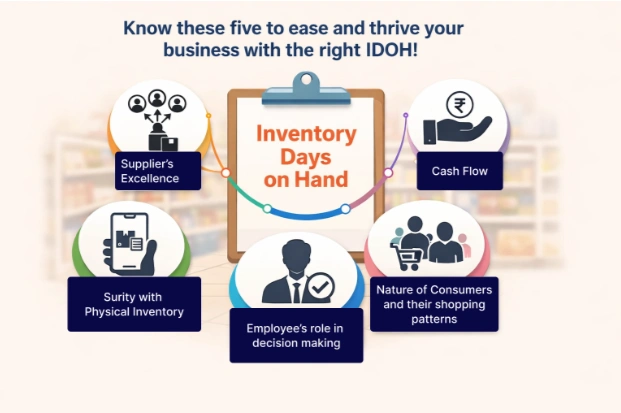
When these factors are understood clearly, maintaining the right Inventory Days on Hand becomes far more predictable and manageable.
Five Practical Areas to Optimise Inventory Days on Hand
1. Suppliers: Where Inventory Decisions Begin
Every inventory cycle starts with a supplier. Supplier performance directly affects how much stock you need to hold and for how long.
To evaluate supplier effectiveness, retailers should be able to answer:
- How quickly do suppliers process and fulfil orders?
- What is the average lead time for each supplier?
- What percentage of deliveries arrive on time?
- How early should orders be placed to avoid stockouts?
- Can suppliers handle bulk or peak-season requirements?
For example, if 80 out of 100 suppliers consistently deliver on time, your IDOH calculations should reflect the remaining 20% risk. This helps retailers plan reorder timing more accurately instead of overstocking “just in case.”
With RetailPOS ERP, supplier lead times, delivery performance, and purchase history are tracked centrally, enabling smarter reorder planning and faster purchase inwards without delays.
2. Inventory Accuracy: Know What You Actually Have
Inventory calculations are only as good as the physical stock data behind them.
In retail environments, stock discrepancies are common. Even in a small store, counting five products can easily reveal mismatches in two. This makes regular stock audits non-negotiable.
To optimise IDOH, retailers must:
- Know the exact stock on hand
- Identify damaged, expired, and non-saleable items early
- Maintain consistency across stores and warehouses
RetailPOS ERP enables continuous stock audits using mobile stock-taking, without interrupting billing or daily operations. Accurate inventory visibility makes demand forecasting and replenishment decisions far more reliable.
3. Employees: Let Systems Drive Decisions, Not Guesswork
As retail operations grow, manual decision-making becomes risky.
For a store managing 5,000+ SKUs, predicting demand, planning purchases, and balancing stock manually is extremely difficult — especially during peak seasons or promotions.
Technology helps by:
- Replacing guesswork with data
- Automating reorders and stock transfers
- Reducing dependency on individual judgement
RetailPOS ERP supports system-driven decision-making, where daily activities like reordering, transfers, and stock balancing are guided by actual sales, movement, and stock data.
This allows employees to focus on execution rather than constant calculation.
4. Consumers: Stock What People Actually Buy
Understanding customer behaviour is essential to maintaining the right Inventory Days on Hand.
Consumer demand changes based on:
- Location
- Season
- Lifestyle trends
- Events and weather
For example:
- During rainy seasons, items like umbrellas, raincoats, and hot snack ingredients sell faster
- Festive periods increase demand for specific categories
- Stocking seasonal products all year inflates IDOH unnecessarily
RetailPOS ERP analyses sales trends, seasonal movement, and outlet-wise demand, helping retailers stock what customers want when they want it without over-investing in slow-moving inventory.
5. Cash: The Most Overlooked Factor in Inventory Planning
Inventory Days on Hand is directly linked to cash flow.
IDOH essentially measures how long your cash stays locked inside inventory.
Retailers should regularly ask:
- Do I know how much cash is available right now?
- Am I investing the right amount in the right products?
- Am I buying too early or too late?
Poor inventory planning usually leads to one of two situations:
- Cash tied up in slow-moving or dead stock (high IDOH)
- Emergency purchases at higher costs due to stockouts (low IDOH)
Both scenarios hurt margins and business stability.
RetailPOS ERP helps retailers define accurate reorder points, automate replenishment timing, and align purchases with actual demand — keeping cash visible and under control.
How Technology Helps Maintain the Right IDOH for Sustainable Growth
Managing suppliers, inventory accuracy, employees, consumers, and cash simultaneously is extremely difficult without technology.
This is where a centralised retail ERP system becomes critical.
With RetailPOS ERP, retailers gain:
- Outlet-wise and SKU-wise inventory visibility
- Automated stock audits and reconciliations
- Demand-driven purchasing and transfers
- Real-time insights into inventory holding days
By clearing dead stock and optimising inventory levels, retailers can:
- Run more stores with the same working capital
- Expand horizontally by opening new outlets
- Grow vertically by adding new categories or departments
Whether it’s a single store or a multi-outlet retail chain, RetailPOS ERP enables data-driven inventory decisions at scale without manual effort.
Final Takeaway
When retailers understand their true Inventory Days on Hand and manage inventory using real data instead of assumptions, growth becomes sustainable and predictable.
Optimised inventory means:
- Healthier cash flow
- Fewer stockouts
- Lower carrying costs
- Better customer satisfaction
With the right systems in place, maintaining the ideal IDOH is no longer guesswork it becomes a measurable, controllable part of daily retail operations.
Book a Free Demo
Modernize your retail operations with faster billing, smarter inventory control, and seamless GST compliance.

 Book your demo
 Talk to our POS experts
- 📧 Email: salesenquiry@uniprotech.co.in
Run your store with confidence. Let technology handle the complexity.